

UIT Purchasing Support
Departmental/University Purchases
All purchasing for IT should be done through SmartBuyMSU
IT Equipment Shipping
Desktop computers, laptop computers, servers, and tablets must be shipped to UIT for
inventory, asset management, and image processing.
Use “960 Technology Blvd” as your Ship-To address for these items.
Technology accessories such as monitors, docking stations, webcams, speakers, and
similar items may be shipped directly to the recipient and do not need to be routed
through UIT.
If you are ordering both a computer and technology accessories, please place them
on separate purchase orders; this allows accessories to be shipped directly to the
recipient and often results in faster delivery, while ensuring computers are processed
according to university requirements.
Items that are bundled with the computer, such as an included keyboard or mouse, should
remain on the same order as the computer.
Ship computers to:
Montana State University
ATTN: UIT, Room 166
960 Technology Blvd
Bozeman, MT 59718
A room number is required for all technology equipment deliveries to MBB. Providing a room number ensures items can be delivered directly to the intended
location. Orders submitted without a room number cannot be reliably delivered to an
individual destination and may be left in an unsecured area within the building, where
proper custody and delivery cannot be ensured
CLICK HERE FOR SmartBuyMSU
ARM Processors AdvisementDo not purchase a computer with an ARM (Advanced RISC Machine) Processor. |
After Your Computer Has Been Delivered
|
When your new computer arrives on campus, you may receive an automated email from
the vendor indicating that it has been delivered to UIT. While this confirms that
the shipment has been received, it does not mean that your computer is ready for pickup or use. |
Non-Standard Technology
Some technology purchases fall outside the university's commonly supported hardware and software offerings. These purchases may include specialized research equipment, VR systems, discipline-specific platforms, non-standard audiovisual solutions, vendor-managed services, and/or other unique technology solutions.
While departments may choose to purchase non-standard technology, purchasers should understand that support, security, accessibility, licensing, infrastructure, integration, and lifecycle considerations may not be fully known until after purchase.
Before purchasing non-standard technology, departments are encouraged to review the Non-Standard Technology Ownership and Support Expectations guidance.
Standard Printer Configurations Now Available
MSU now offers standard printer models through CDWG, selected to meet the most common printing needs across campus. These
recommended configurations ensure compatibility, reliability, and cost-effectiveness
for departmental use.
To find these printers, click on the CDWG link in SmartBuyMSU, and you will see the
Standard Printers link on the left side. 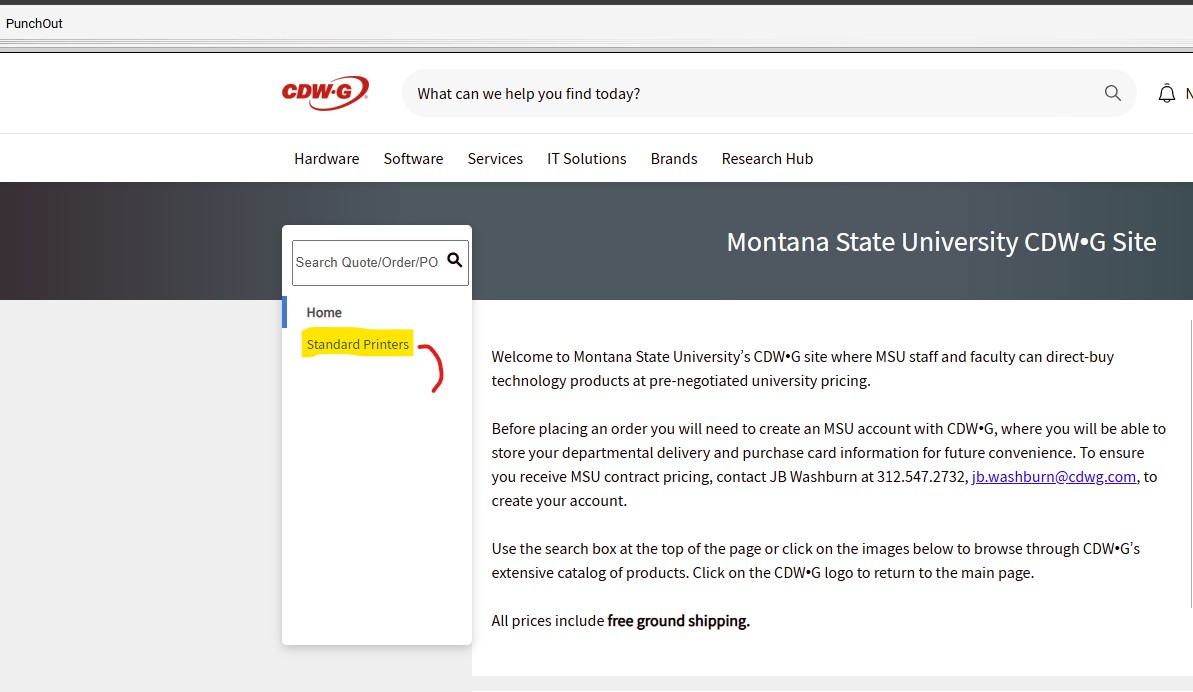
More information is available at montana.edu/uit/purchase/copiers_printers.
🔐 Purchasing Advisory: Refurbished Computers
Refurbished computers are strongly discouraged due to elevated security risks. These devices may contain outdated firmware, residual data, or unverified hardware
modifications that could compromise organizational security and compliance standards.
Additional concerns include:
Shortened device lifespan and unpredictable performance,
Inconsistent hardware configurations, complicating IT support and software compatibility,
Limited or non-standard warranties, increasing long-term risk.
🚫 Important: If you believe a refurbished device is necessary for your college or
department, you must first contact your Departmental IT team or UIT Purchasing for review and approval.
Unapproved orders for refurbished computers will be denied.
🔐Purchasing Advisory: Faculty & Staff Separate Component / Build Your Own Purchases
UIT strongly discourages Component / Build Your Own computers due to security, compatibility, and support risks. Prebuilt, enterprise‑approved systems
are the preferred option.
🚫 Important: If you believe a custom component / Build Your Own purchase is absolutely necessary
for your department or college, you must first contact your Departmental IT team or UIT Purchasing for review and approval.
Unapproved orders for refurbished computers will be denied.
- Ensures the computer has the correct operating system
- Ensures proper installation of the “Stack”
- i.e. Ivanti or JAMF as applicable, are installed pursuant to the Technology Management Standards, which can be found on the Technology Management Standards policy page.
- Items should be returned/refunded, and the correct item purchased with a new transaction. Exchanges are not possible.
- User must initiate returns themselves directly with the supplier.
- User is responsible for shipping the return back to the supplier.
- MSU Mail Services can assist with return shipping.
- Third Party Shipping Information
- If you have issues with a vendor, initiating a return/refund, please send an email to smartbuymsu@montana.edu
- User is responsible for shipping the return back to the supplier.
- Use SmartBuyMSU to purchase the new or replacement items needed.
- Refund and/or Restocking Fees may be applied by the vendor.
- Need help trying to figure out what kind of computer to order?
- Contact you Departmental IT Team
- Contact UIT Purchasing
- Contact UIT Purchasing by email.
- There will be a fee of 6% of the total value of your order, if you request that UIT purchase your needed items in SmartBuy MSU for you.
- If you order your items through SmartyBuyMSU yourself, there is no additional charge.
- Note that UIT Purchasing/Receiving receives IT Computer orders, but does not do the set-up and deployment of computer systems.
- Set-up and Deployment of computers is done by either your Departmental IT Team, or UIT Desktop Support.
- UIT Purchasing/Receiving targets a 3-business-day turnaround from the time the item is received, to the time we deliver it to your Department, your Departmental IT Team, or UIT Desktop Support for set-up and deployment.
- Click Here for Departmental IT Contact Information






Personal
Purchases
Personal
Purchases

Faculty, staff, and students can use the following links to purchase Dell or Apple products for personal use
Products we support:
- Software and user support is provided for these (and most) items listed below, however only hardware warranty repair is done on desktop & laptop computers.
- Begining in October, 2025, Microsoft is ending support for Windows 10; MSU-owned devices must be updated to Windows 11 and will be required for all new departmental Windows computers, regardless of where they are purchased.
- Apple iPads and Windows Surface tablets purchased from any source (software only, no hardware repairs)
- Any Apple product purchased from the MSU Bookstore
- Any MSU preconfigured Dell, Apple, Lenovo or Microsoft Surface computer.
- Any MSU approved hardware component or printer from the CDW-G catalog.