

Creating an uv Environment on Tempest
uv only creates environments for python, not R or julia.
Environments are useful for handling dependencies of packages. For python uv is our suggested environment manager, and is our recomended replacement for mamba. It is important to note that uv only works for making python environments.
uv is not quite a drop-in replacement for Conda. However uv is preferred because it is much faster than Conda, and after the environment is set up running the environment is simpler.
Creating a Custom uv Environment
uv environments allow you to define a specific set of packages that will operate together. For example, if you had a python script dependent on Python 3.12, you could create a uv environment with Python 3.12, and run the script inside of that environment.
The below documentation is pulled from uv's documentation.
Set Up uv
First we need to load uv module. Search uv modules (available on tempest)
ms uv
This will show a list of available uv modules, select the latest one, or the one that is required.
Then load the selected version of mamba module.
module load <selected-module>
In this example we use the latest version of uv, so our command will be
module load tools/uv/
Create a New uv Environment
Now, you can create the new uv environment. The uv venv command creates a new environment. You can create an environment with the name <name of env>by calling:
uv venv <name of env> --python <version>
This will create a folder with the environet name that holds the environment. After
this process has finished, you can activate the environment by calling source /path/to/env/bin/activate. To deactivate the environment call deactivate.
For example, to create a new environment called my_env with python 3.11, you would run the following:
uv venv my_env --python 3.11
Then run the following to activate the environment:
source my_env/bin/activate
Once an environment is activated, uv pip install can be used to install further packages into the environment:
uv pip installbqplot# now you can use bqplot in my_env
uv pipinstall"matplotlib>=3.5.0"cartopy# now you installed matplotlib with version>=3.5.0and the default version of cartopy
Adding Packages from a Requirements.txt
To add packages from a requirements.txt go to files in tempest and create, or upload a file with extension .txt. The syntax for a requirements.txt file is the following:
# comments
package_name
# ==, => or =< can be used to specify a version of the package
An example is as follows:
# You can add comments to requirements.txt files
numpy
scipy == 1.17.0
pandas >= 1.0
uv cannot add packages directly from a YAML file.
To install from a requirements.txt file, ensure you have the environement active, and run the following command:
uv pip install -r requirements.txt
Running a uv environment in a SBATCH job on Tempest
To run the environment during a job you do not need to load uv. You only need to add
the following command source path/to/venv/bin/activate. An example of which can be seen below:
#!/bin/bash
#SBATCH --partition=priority
#SBATCH --cpus-per-task=1
#SBATCH --account=priority-YOUR PI GROUP NAME HERE
#SBATCH --mem=4G
#SBATCH --time=0-1:0:00
#SBATCH --output=%x-%j.out
#SBATCH --error=%x-%j.err

source /home/netid/UV_TESTS/my_env/bin/activate
python /home/netid/UV_TESTS/python_script.py
Using uv Environments in Jupyter Lab
Add the Environment Jupyter Lab
Make the environment accessible to Jupyter by running the following while your environment is active:
uv pip install ipykernel

python -m ipykernel install --user --name=jupyter-numpy-env

#this name will show in the kernel list in jupyter notebook
Test the Kernel
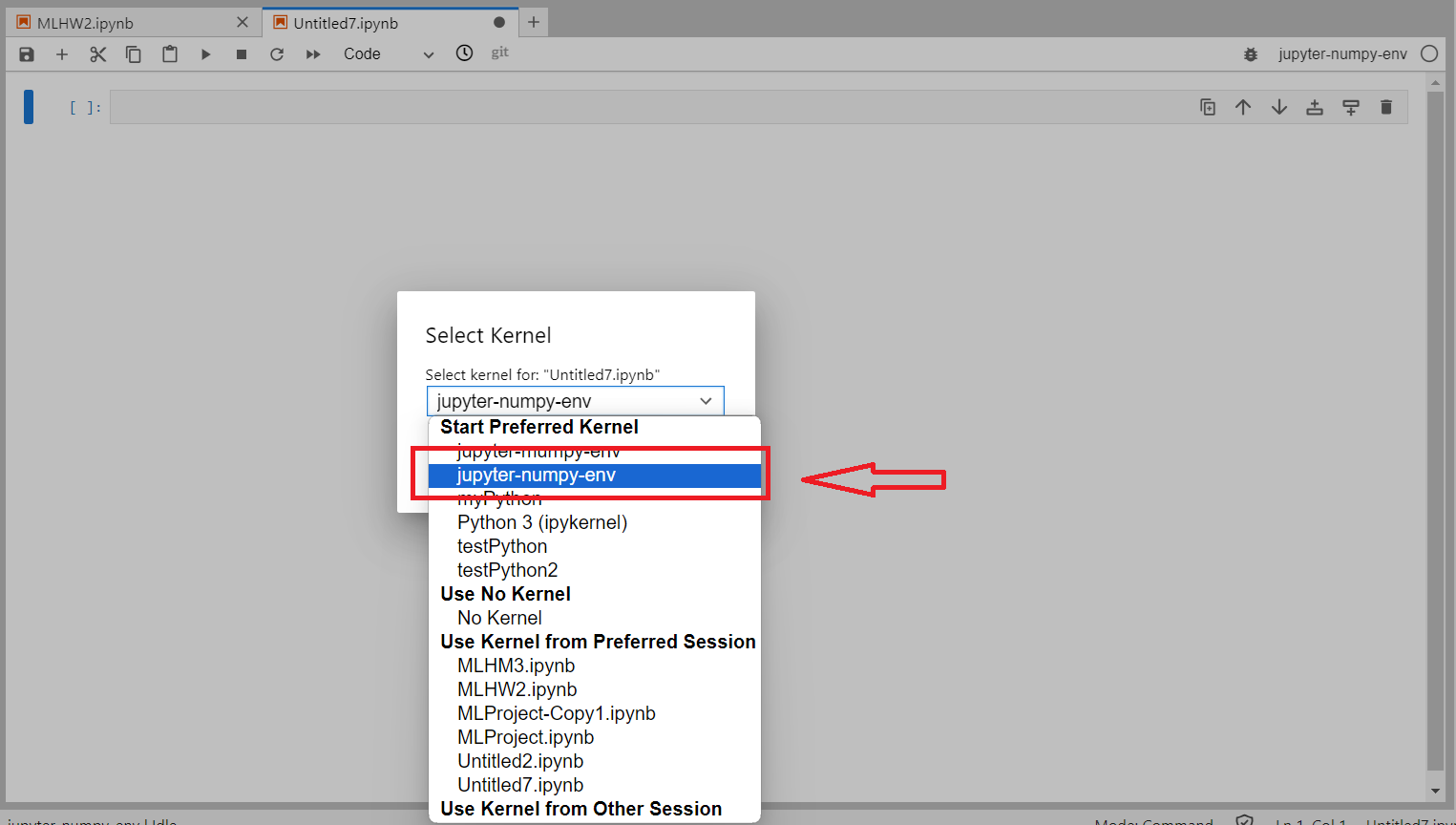
Once you launch Jupyter Notebooks, select the kernel dropdown in the upper right of the screen and select your newly created kernel. In the example code above, this name would be jupyter-numpy-env. Then restart the kernel in the toolbar. This should result in your Jupyter Notebook running on the new kernel.
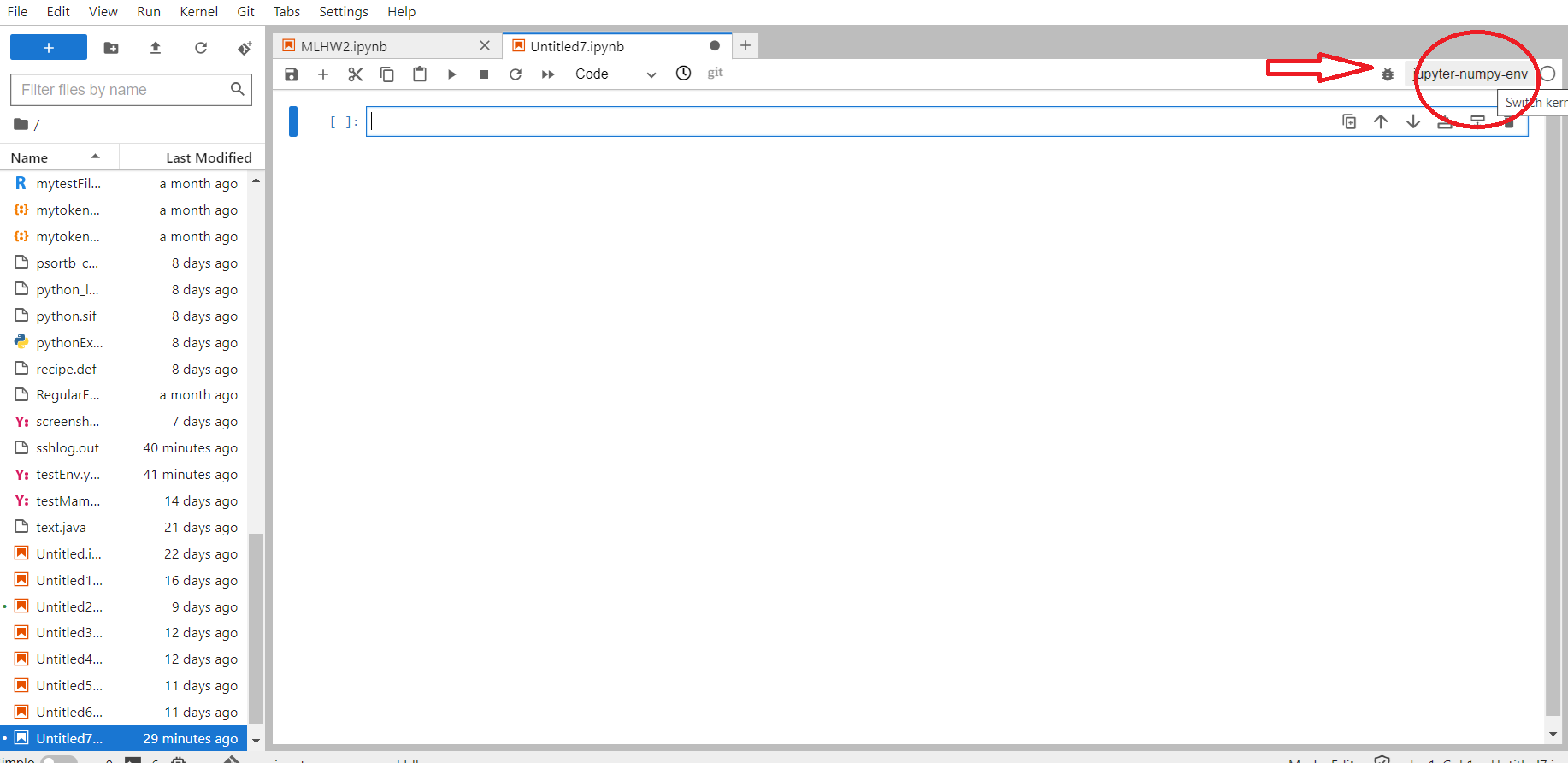
Once you hit the text appearing in the upper right corner of the screen, a selection bar will appear, as shown in below image. To use your new environment, select the appropriate kernel from the list.
Making a shared uv environment
By default uv uses a python that is stored in the users homefolder. This means it does not work when others want to use the uv environment. To enable multiple users to use the same uv environment python will need to be installed to a shared location. To install python to a specific place and then create a uv environment with that version of python run the following commands:
uv python install --install-dir <path to install> <Version of python>
uv venv <env name> --python=<path to python>
An example is as follows:
uv python install --install-dir . 3.12 #installs python version 3.12 to the current directory. It creates a directory called cpython-3.12.13-linux-x86_64-gnu

uv venv my_env --python=cpython-3.12.13-linux-x86_64-gnu #makes a virtual environment that uses the python created in the previous step.
The environemnt is then useable in the same way as above.